MCP use cases
Three architectures on pdfnative-mcp v1.7.0 (pdfnative ≥ 1.8.0, Node ≥ 22): one shared HTTP server whose outputs are files, a token-frugal typesetting loop, and multilingual PDF/A notices in 27 scripts.
pdfnative-mcp v1.7.0 exposes the pdfnative ≥ 1.8.0 engine to conversational assistants as 28 tools and seven prompts, over stdio or Streamable HTTP (MCP 2026-07-28 with automatic legacy fallback), on Node ≥ 22. This guide is the MCP companion of the ecosystem use cases: three architectures assembled from inputs the MCP guide documents, each with its building blocks, one load-bearing call and its limits.
Case 1 — One shared server, sandboxed files, bearer token#
The default MCP deployment is one stdio process per host: every desktop and
every agent runtime spawns its own npx pdfnative-mcp, every generated PDF
travels back as base64 inside the JSON-RPC response, and nothing is shared. For
a team — or a fleet of agents — that is N processes, N separate caches, and
each PDF as base64 (about 4/3 of its size) in the model context. Four operator
variables turn the same binary into one shared server whose outputs are files
the clients reference instead of bytes they carry.
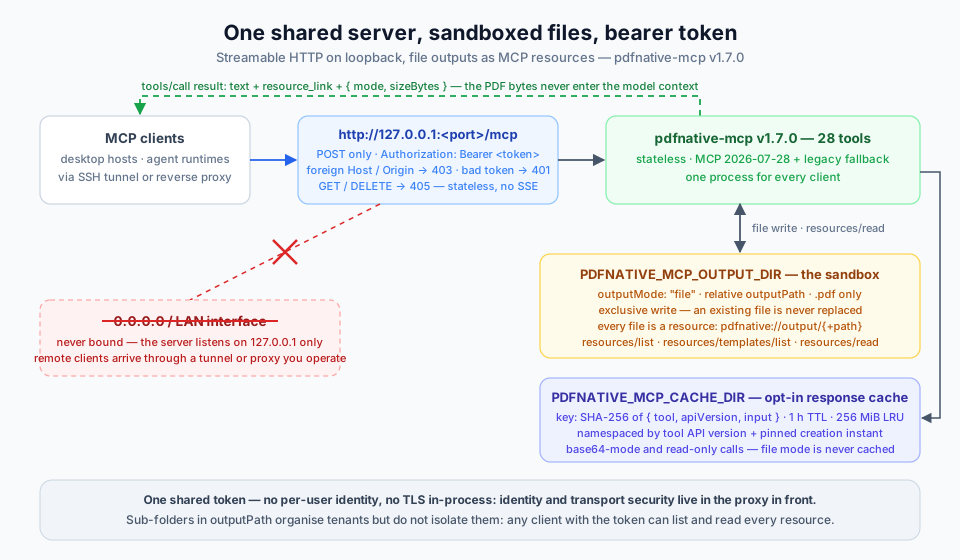
The building blocks, all in the server's environment variables:
PDFNATIVE_MCP_PORTswitches the transport to Streamable HTTP athttp://127.0.0.1:<port>/mcp. The socket is bound to127.0.0.1only; a request whoseHostorOriginnames anything but a loopback authority is answered403before it reaches MCP, and theOriginport must equal the server port.PDFNATIVE_MCP_HTTP_TOKEN(at least 16 characters, no whitespace — a weaker value refuses to start) requiresAuthorization: Bearer <token>on every request; a missing or wrong token gets401+WWW-Authenticate. The comparison is constant-time and the token is never logged.PDFNATIVE_MCP_OUTPUT_DIRenablesoutputMode: "file":outputPathmust be relative, end in.pdf, and resolve inside the sandbox (no absolute paths, no NUL bytes, nothing that resolves outside the sandbox). The write is exclusive — an existing file is never replaced. Every PDF in the sandbox is an MCP resource underpdfnative://output/{+path}, enumerated byresources/listand fetched byresources/read; the tool result itself carries aresource_link.PDFNATIVE_MCP_CACHE_DIRadds a content-addressed response cache: the key is the SHA-256 of{ tool, apiVersion, input }, 1 h TTL, 256 MiB LRU, and the namespace includes the tool API version and the operator's pinned creation instant, so an engine upgrade or a change of pin never serves old bytes.
# One shared secret: keep it in your secret store and give the same value to every client.
TOKEN="$(openssl rand -hex 24)"
PDFNATIVE_MCP_PORT=3000 \
PDFNATIVE_MCP_HTTP_TOKEN="$TOKEN" \
PDFNATIVE_MCP_OUTPUT_DIR=/srv/pdfnative/out \
PDFNATIVE_MCP_CACHE_DIR=/srv/pdfnative/cache \
npx -y pdfnative-mcp
# stderr: [pdfnative-mcp] ready (HTTP transport, MCP 2026-07-28 + legacy) on http://127.0.0.1:3000/mcp — bearer token required
# every client request: Authorization: Bearer $TOKEN
{ "tool": "generate_basic_pdf", "arguments": {
  "title": "Invoice INV-2026-0042",
  "outputMode": "file",
  "outputPath": "acme/2026/INV-2026-0042.pdf",
  "creationDate": "2026-09-01T00:00:00Z",
  "blocks": [
    { "type": "heading", "text": "Invoice INV-2026-0042", "level": 1 },
    { "type": "paragraph", "text": "Total due: 1 234,56 EUR" }
  ]
}}
The result is one text line (generate_basic_pdf: wrote <n> bytes to <path>), a
resource_link whose URI is pdfnative://output/acme/2026/INV-2026-0042.pdf,
and structuredContent: { mode: "file", sizeBytes, filePath } — no PDF bytes.
A client that needs the document later calls resources/read with that URI and
receives it as a base64 blob, or hands the URI to a human as a stable
reference.
What you gain, concretely:
- Bytes never enter the model context. In file mode the response is a few hundred bytes whatever the document weighs (up to the 50 MiB output cap); the PDF is fetched only when something actually needs it.
- Repeated calls are served from disk. Base64-mode and read-only calls with identical
input are served from the SHA-256 cache with
_meta.cached: true— and the namespace guarantees a cache hit is always bytes the current engine, API version and pin would produce. The encryption, signing, LTV, timestamp and metadata tools, and any call carryingencrypt, are never cached. - One process, one secret. N hosts share one server, one cache and one
token instead of N stdio processes with nothing in common; pin the instant once with
PDFNATIVE_MCP_CREATION_DATEand every client's output is byte-identical on every host.
Honest limits: the server binds 127.0.0.1 only and never a public interface
— remote clients reach it through an SSH tunnel or a reverse proxy you operate,
and that proxy is also where TLS terminates, because the server speaks plain
HTTP in-process. There is one shared token and no per-user identity: sub-folders
in outputPath organise tenants but do not isolate them, since every client
holding the token can list and read every resource. Serving is stateless:
GET and DELETE /mcp answer 405, so there is no SSE resumability. And
file-mode calls are deliberately never cached — the filesystem side effect is
part of the contract.
Case 2 — Token-frugal typesetting loop: preview, produce, read back#
An assistant that lays out a report by rendering it, reading the PDF back and
adjusting is paying for the bytes twice on every iteration. Since v1.6.0 the
pagination question can be answered without rendering anything, and since
v1.7.0 the answer accounts for typography too: inspect_layout accepts the
same blocks, the same embedFonts and the same typography object as
generate_basic_pdf, runs the builder's own pagination
planner, and returns where every block lands. With verbosity: "summary" and a
fields projection the answer is a handful of tokens.
The building blocks: inspect_layout with typography, embedFonts,
verbosity: "summary" and fields; the typography object (twelve keys, all
off by default — splitParagraphs with orphans / widows,
keepHeadingsWithNext, opticalMargins, kerning, fontFeatures, …) on the
nine document tools; the block-level paragraph.align,
paragraph.keepWithNext, paragraph.splittable and heading.keepWithNext
on generate_basic_pdf and inspect_layout; the typography
prompt as the one-screen summary; and inspect_pdf
with fields: ["pageCount"] to confirm the result. A placeholder-free example
lives in the server repository as examples/typography-report.json.
{ "tool": "inspect_layout", "arguments": {
  "title": "Annual report",
  "embedFonts": true,
  "typography": {
    "splitParagraphs": true, "orphans": 3, "widows": 3,
    "keepHeadingsWithNext": { "minLines": 3 },
    "opticalMargins": true, "kerning": true
  },
  "blocks": [
    { "type": "heading", "text": "Results", "level": 1 },
    { "type": "paragraph", "align": "justify", "text": "The year in one long paragraph that may now continue on the next page, never leaving fewer than three lines on either side of the break." },
    { "type": "heading", "text": "Figures", "level": 2, "keepWithNext": true },
    { "type": "paragraph", "text": "The table below summarises the year.", "keepWithNext": true },
    { "type": "table", "headers": ["Quarter", "Revenue"], "rows": [["Q1", "120"], ["Q2", "180"]] }
  ],
  "verbosity": "summary",
  "fields": ["totalPages"]
}}
The structured result is { "totalPages": 1 } — or, without fields, the
per-page list of blocks with their type, x, top, width and height, so
the assistant can see that the heading did move with its table before spending
a build. When the layout is right, call generate_basic_pdf with identical
arguments (the same typography, the same embedFonts): the preview and the
build share one planner, so the page count matches. Then inspect_pdf with
verbosity: "summary" and fields: ["pageCount"] confirms it on the produced
file for a few tokens more. The same options exist on the CLI (render --split-paragraphs, --keep-headings-with-next, --kerning,
--font-features) and on the React Document root as the typography prop.
What you gain, concretely:
- Pagination decisions cost a few dozen tokens of response — the
arguments are the build's own; the answer is a page count, not a rendered
PDF and a read-back. Iterate on
orphans,keepWithNextandsplittableagainst the summary; render once. - Bytes arrive once. In base64 mode the PDF is a single embedded
resourcecontent block, not duplicated intostructuredContent; in file mode it is aresource_link(Case 1). - Nothing moves unless asked. Every typography key is off by default, so omitting the object changes nothing; the only byte differences from v1.6.0 are the engine's own 1.8.0 corrections (embedded subsets, printer's marks, shaped scripts — see the migration notes in the MCP guide).
Honest limits: kerning, fontFeatures and the narrow no-break space of the
'fr' punctuation preset need embedFonts: true — base-14 Helvetica has no
GPOS / GSUB tables and no U+202F glyph, so kerning and features do nothing
there and 'fr' degrades to 'fr-CA'. No hyphenation dictionary is installed:
hyphenationLanguage is accepted and has no effect; soft hyphens (U+00AD) in
long words are honoured. tnum and lnum change nothing on the bundled Noto
Sans (diagnostic TYPOGRAPHY_FEATURE_INEFFECTIVE, an error under
strict: true). And the catalogue is large: tools/list is about 306 kB
because the typography fragment is inlined in every tool that carries it —
hosts should honour its 24 h public cache hint rather than refetch it per
session.
Case 3 — Multilingual notices in 27 scripts from a conversation#
A safety notice, a consent form or a receipt that must exist in the reader's
own script is usually a font-procurement project before it is a document
project. add_international_text removes the procurement: it routes each run
of text to the bundled Noto face that covers it, shapes it with the engine's
script shapers, always embeds the fonts, and can claim PDF/A — from a single
tool call inside a conversation.
The building blocks: add_international_text with a lang array covering the
27 scripts — including, since v1.7.0, lo (Lao, dedicated shaper), nod
(Tai Tham) and cjm (Cham) through the Universal Shaping Engine, khb
(New Tai Lue) and tdd (Tai Le), plus the latin aliases ha, yo, ig
and sw whose tone marks are anchored; pdfA: "pdfa2b" with strict: true
so a diagnostic fails the call instead of shipping a wrong claim;
creationDate for byte-identical output; and extract_text, which returns the
/ActualText of tagged output so complex scripts round-trip exactly. The
strings below are copied from the server's examples/scripts-lao-tai-cham.json.
{ "tool": "add_international_text", "arguments": {
  "title": "Safety notice — three scripts of mainland South-East Asia",
  "lang": ["lo", "nod", "cjm", "latin"],
  "pdfA": "pdfa2b",
  "strict": true,
  "creationDate": "2026-09-01T00:00:00Z",
  "paragraphs": [
    "Lao — ສະບາຍດີຊາວໂລກ",
    "Tai Tham (Lanna) — ᨣᩤᩴᨾᩮᩬᩥᨦ",
    "Cham — ꨀꨇꩉ ꨌꩌ"
  ]
}}
lang is an array so each run is routed to the font that covers it — latin
carries the English labels and is added automatically under a PDF/A claim.
The claim is pdfa2b on purpose (see the limits). Feed the result to
extract_text and the three paragraphs come back in logical order, because
the tagged output carries /ActualText for every marked-content span.
What you gain, concretely:
- Shaped text, not glyph soup. Lao has a dedicated shaper; Tai Tham and Cham go through the Universal Shaping Engine; mark positioning is the engine's, not the viewer's.
- Embedded fonts, valid claim. The tool has no
embedFontsinput because it always embeds; withstrict: truethe PDF/A-2b claim either validates or the call fails with the diagnostic code — the server's own veraPDF corpus holds the new scripts to that. - Zero setup. No font files, no licences to chase, no shaping library: the
faces come from the local
pdfnativeinstall as lazily loaded modules, and the bytes are reproducible oncecreationDateis pinned.
Honest limits: there are no custom fonts on the MCP surface — the operator-side
font sandbox (PDFNATIVE_MCP_FONT_DIR) is on the roadmap, not in v1.7.0; a
house typeface needs the CLI (render --font-file) or the library. Tai Tham
under PDF/A-2u fails veraPDF (one shaped glyph has no ToUnicode entry,
rule 6.2.11.7.2), so use pdfa2b whenever nod is in the list — the other
four new scripts pass level U. Text extraction from an untagged PDF returns
visual order for eleven scripts; a pdfA claim makes the output tagged, which
is what turns extraction exact. And annotate_pdf has no link annotation
type yet (the engine's markup union lacks it); the link block of
generate_basic_pdf covers new documents.
See also#
- Ecosystem use cases — the hub: five cross-surface architectures, four with diagrams.
- MCP guide — the complete v1.7.0 tool, prompt, environment and error reference.
- CLI use cases — the same engine from a shell and a CI runner.
- React use cases — the same engine as JSX, on the server, the edge and the reader's device.
- MCP playground — the tool catalogue and the call shapes, in the browser.