Pure Native PDF Generation

Zero dependencies. ISO 32000-1 compliant. 16 Unicode scripts with BiDi and OpenType shaping. TypeScript-first.

CI status CodeQL security scan OpenSSF Scorecard npm version npm monthly downloads Minified + gzipped bundle size Zero runtime dependencies TypeScript strict mode npm provenance signed MIT License pdfnative-cli npm version pdfnative-mcp npm version
npm install pdfnative
1 818+
Tests
95%+
Coverage
0
Dependencies
16
Unicode Scripts
5
PDF Standards
GitHub Stars

Everything You Need

Production-grade PDF generation with no compromises. Every feature built from scratch.

Zero Dependencies

Built from scratch in pure TypeScript — tree-shakeable, auditable, and free from supply-chain risk. Even the crypto is built in.

16 Unicode Scripts

Thai, Arabic, Hebrew, Bengali, Tamil, CJK, Cyrillic, Greek, Devanagari, and more. Full UAX #9 BiDi — isolates + explicit embeddings (LRE/RLE/LRO/RLO/PDF). OpenType GSUB/GPOS shaping for Thai, Arabic, Devanagari, Bengali, and Tamil.

ISO Compliant

PDF 1.7 (ISO 32000-1), PDF/A-1b/2b/2u/3b (ISO 19005), PDF/UA tagged accessibility. Structure tree, XMP metadata, ICC profiles.

Security Built-in

AES-128/256 encryption with granular permissions. CMS/PKCS#7 digital signatures — RSA and ECDSA P-256. One-call placeholder injection via addSignaturePlaceholder() (v1.2.0). Zero external crypto deps.

Rich Content

12 block types: tables, images, barcodes (5 ISO formats), SVG, AcroForm fields, TOC, watermarks, hyperlinks. Pure PDF vector ops — no rasterization. Smart tables (v1.2.0): multi-page slicing with repeated headers, auto-wrap, zebra striping, captions. Tables guide →

Production Ready

AsyncGenerator streaming (incl. object-boundary page-by-page, v1.2.0), Web Worker off-thread generation, PDF parser & modifier. 1 822+ tests across 53 files, 95%+ coverage, SLSA provenance.

AI Integration — MCP

Use pdfnative from Claude Desktop, Cursor, Continue, Zed, and any other stdio MCP client (Cline, Windsurf, Goose, Gemini CLI…) via pdfnative-mcp v0.3.0. 9 production tools incl. inspect_pdf, pdfA flag everywhere, MCP 2025-06-18 outputSchema. Zero configuration beyond npx -y pdfnative-mcp.

Command-Line Interface

Render, sign, inspect & verify PDFs from the terminal with pdfnative-cli v0.3.0. End-to-end signing pipeline (RSA + ECDSA-SHA256), real CMS/PKCS#7 verify with RFC 3161 detection, render --watch / --template / --font, automatic signature-placeholder injection. Read the CLI guide → · Try the playground →

Simple, Powerful API

Two builders for every use case — table-centric financial reports or free-form documents.

import { buildPDFBytes, downloadBlob } from 'pdfnative';

const pdf = buildPDFBytes({
  title: 'Monthly Report',
  infoItems: [
    { label: 'Period', value: 'January 2026' },
    { label: 'Account', value: 'Main Account' },
  ],
  balanceText: 'Balance: $1,234.56',
  countText: '42 transactions',
  headers: ['Date', 'Description', 'Category', 'Amount', 'Status'],
  rows: [
    { cells: ['01/15', 'Grocery Store', 'Food', '-$45.00', ''],
      type: 'debit', pointed: false },
    { cells: ['01/16', 'Salary', 'Income', '+$3,000.00', 'X'],
      type: 'credit', pointed: true },
  ],
  footerText: 'Generated by MyApp',
});

downloadBlob(pdf, 'report.pdf');
import { buildDocumentPDFBytes } from 'pdfnative';

const pdf = buildDocumentPDFBytes({
  title: 'Project Report',
  blocks: [
    { type: 'toc' },
    { type: 'heading', text: 'Executive Summary', level: 1 },
    { type: 'paragraph', text: 'This quarter saw strong growth...' },
    { type: 'image', data: chartBytes, width: 400,
      align: 'center', alt: 'Revenue chart' },
    { type: 'list', style: 'bullet',
      items: ['Revenue up 15%', 'Costs down 8%', 'Net profit +23%'] },
    { type: 'barcode', format: 'qr', data: 'https://example.com',
      width: 80, ecLevel: 'M' },
    { type: 'svg', content: svgString, width: 300 },
    { type: 'formField', fieldType: 'text', name: 'notes',
      label: 'Notes', width: 400 },
  ],
  footerText: 'Confidential',
  tagged: 'pdfa2b',     // PDF/A-2b compliance
  compress: true,        // FlateDecode compression
});
import { registerFonts, loadFontData, buildDocumentPDFBytes }
  from 'pdfnative';

// Register lazy-loaded Noto Sans font data modules
registerFonts({
  th: () => import('pdfnative/fonts/noto-thai-data.js'),
  ar: () => import('pdfnative/fonts/noto-arabic-data.js'),
  bn: () => import('pdfnative/fonts/noto-bengali-data.js'),
  ja: () => import('pdfnative/fonts/noto-jp-data.js'),
});

// Load only the scripts you need
const fonts = await Promise.all(
  ['th', 'ar', 'bn', 'ja'].map(loadFontData)
);
const fontEntries = fonts.filter(Boolean).map((fd, i) => ({
  fontData: fd!, fontRef: `/F${3 + i}`,
  lang: ['th', 'ar', 'bn', 'ja'][i],
}));

const pdf = buildDocumentPDFBytes({
  title: 'Multi-Language Document',
  blocks: [
    { type: 'heading', text: 'สวัสดี — مرحبا — こんにちは', level: 1 },
    { type: 'paragraph',
      text: 'pdfnative renders Thai, Arabic (with BiDi), Bengali, ' +
            'and Japanese — all from a single API call.' },
  ],
  fontEntries,
  tagged: true,  // PDF/A-2b with structure tree
});

Try It Live

Pick an example, edit the code, then click "Generate PDF" — it runs entirely in your browser via the npm CDN.

View source ↗

Need more? Browse all 28 generator categories (~161 sample PDFs) on GitHub.

30-Second Start

Three adoption paths — pick the one that fits your stack. All three are zero-config and zero-build.

Library v1.1.0

For TypeScript / JavaScript apps.

npm install pdfnative
import { buildDocumentPDFBytes } from 'pdfnative';
const pdf = buildDocumentPDFBytes({
  title: 'Hello',
  blocks: [{ type: 'paragraph', text: 'Hello, world.' }],
});
Quick Start guide →

CLI v0.3.0

For shells, CI, and Makefiles.

echo '{"blocks":[{"type":"paragraph","text":"Hi"}]}' \
  | npx pdfnative-cli render -o out.pdf
# Sign and verify (RSA or ECDSA)
npx pdfnative-cli sign -i out.pdf -o signed.pdf \
  --key key.pem --cert cert.pem
npx pdfnative-cli verify -i signed.pdf
CLI guide →

MCP v0.3.0

For Claude Desktop, Cursor, Continue, Zed, …

{
  "mcpServers": {
    "pdfnative": {
      "command": "npx",
      "args": ["-y", "pdfnative-mcp"]
    }
  }
}

Drop into your MCP client config — 9 tools become available instantly.

MCP guide →

Full onboarding cheatsheet →

How It Compares

Feature-by-feature comparison with popular PDF libraries.

Feature pdfnative pdfkit jsPDF pdfmake pdf-lib
Runtime dependencies 0 6 3 3 4
TypeScript native @types @types
Unicode scripts 16 Via fontkit Custom fonts Via pdfkit Via @pdf-lib/fontkit
BiDi (Arabic / Hebrew)
PDF/A compliance 4 levels
AES encryption 128 + 256
Digital signatures RSA + ECDSA
Barcodes / QR codes 5 formats QR
SVG rendering Plugin Paths only
Interactive forms
Streaming output
PDF parser / modifier
Browser + Node.js Via bundler
Tree-shakeable

Performance

Pure string assembly with zero allocations in hot paths. Measured with vitest bench.

100 rows (Latin)
~0.9 ms
500 rows (Latin)
~3.5 ms
1 000 rows (Latin)
~7 ms
5 000 rows (Latin)
~35 ms
100 rows (Unicode)
~1.5 ms
500 rows (Unicode)
~5 ms
1 000 rows (Unicode)
~12 ms

Benchmarks run on Node.js 22, Apple M-series / Intel i7. Results may vary. Run npx vitest bench to measure on your hardware.

Designed for low-impact computing

No carbon claims, no offsets, no badges. Just architectural choices that keep the runtime small, local, and verifiable from the source tree.

On-device generation

PDFs are assembled in the calling process — Node, browser, Worker, Deno, Bun. No SaaS round-trip; no document leaves the user's machine unless the application chooses to send it.

Zero runtime dependencies

An empty dependencies field in package.json. No transitive npm graph to install, audit, or patch.

No telemetry, no network calls

The library never opens a socket. Verifiable by reading the source — there is no analytics endpoint, no auto-update channel, no remote font fetch.

Tree-shakeable ESM

"sideEffects": false with strict module boundaries. Only the features your build actually imports end up in production bundles.

Streaming output

streamPdf() yields Uint8Array chunks via AsyncGenerator, so even very large documents fit in bounded memory on edge runtimes and serverless platforms.

External tooling stays external

The optional veraPDF reference validator runs as a CI tool, downloaded once per workflow run. It is never bundled with the npm package or required by consumers.

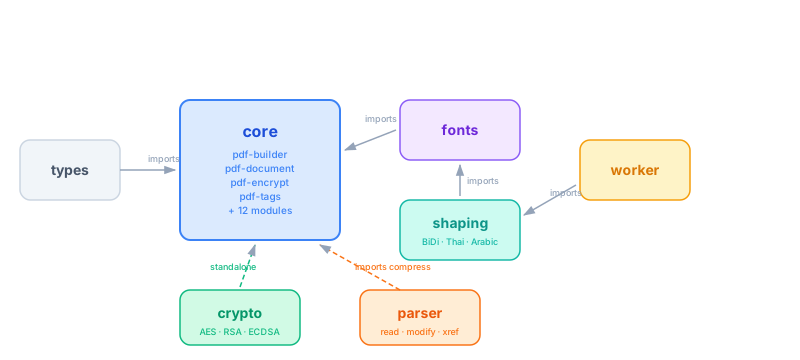
Architecture

Strict unidirectional dependency flow. No circular imports. Each module is independently testable.

Use pdfnative from Any AI Client

pdfnative-mcp v0.3.0 is a Model Context Protocol server that exposes the full pdfnative library to Claude Desktop, Cursor, Continue, Zed, and any other MCP-compatible AI client. One npx command, no code required. Now with inspect_pdf, a pdfA flag on every document tool, multi-script lang, and per-tool outputSchema (MCP 2025-06-18 spec).

9 Production Tools

ToolPurpose
generate_basic_pdfMulti-page documents (headings, paragraphs, lists). Optional pdfA flag.
add_tableTabular reports — now with optional autoFitColumns and clipCells (pdfnative v1.1 TableBlock).
add_barcodeQR Code, Code 128, EAN-13, Data Matrix, PDF417
add_international_text16 scripts with BiDi & OpenType shaping. lang now accepts string, string[], or comma-separated — e.g. ["ar", "emoji"].
add_formInteractive AcroForm fields
embed_imageJPEG / PNG image embedding
prepare_signature_placeholderPDF with /Sig field ready to sign
sign_pdfCMS/PKCS#7 signatures (RSA & ECDSA)
inspect_pdf NEW v0.3.0Read-only inspection — version, page count, encryption, PDF/A claim, signatures, info dict; optional CI-style check: ('pdfa'|'signed'|'encrypted')[].
Find pdfnative useful? Star it on GitHub.

Claude Desktop — 3-line setup

{
  "mcpServers": {
    "pdfnative": {
      "command": "npx",
      "args": ["-y", "pdfnative-mcp"]
    }
  }
}

Supports Cursor, Continue, Zed, and any stdio MCP client. See the MCP Integration Guide → · Try the MCP playground →

Use pdfnative from your shell, CI, or Makefile

pdfnative-cli v0.3.0 is the official command-line interface. Four commands, zero extra runtime dependencies, stdin/stdout pipelines, NPM-provenance signed. v0.3.0 finishes the digital-signature story with end-to-end signing (RSA + ECDSA-SHA256), full CMS/PKCS#7 verification, RFC 3161 timestamp detection, and a fast render --watch / --template / --font iteration loop.

4 Production Commands

CommandPurpose
render v0.3.0JSON → PDF with hybrid flags + --layout. New: --watch (re-render on change), --template <file.json> (deep-merge base), --font {latin,emoji} (bundled font shortcuts).
sign v0.3.0End-to-end CMS/PKCS#7 signing. ECDSA-SHA256 fully wired. Auto-injects the AcroForm signature placeholder when missing — sign any render output in one command.
inspectRead-only PDF analysis. --verbose, --pages, and --check pdfa|signed|encrypted for CI assertions.
verify v0.3.0Real CMS/PKCS#7 verification — signature value (RSA + ECDSA-SHA256), message digest, certificate chain, trust roots, RFC 3161 timestamp token detection. JSON report.
Powering this CLI? Star pdfnative on GitHub.

One npx away

# Render → sign → verify, end-to-end
echo '{"blocks":[{"type":"paragraph","text":"Hello, signed world."}]}' \
  | npx pdfnative-cli render -o out.pdf

npx pdfnative-cli sign -i out.pdf -o signed.pdf \
  --algorithm ecdsa-sha256 \
  --key key.pem --cert cert.pem --reason "Approved"

npx pdfnative-cli verify -i signed.pdf --strict

Keys, certs, and encryption passwords are read from env vars (PDFNATIVE_SIGN_KEY, PDFNATIVE_ENCRYPT_OWNER_PASS…) and never logged. See the CLI guide → · Try the CLI builder →

Born from Production Needs

The code that became pdfnative was originally built inside plika.app — a personal finance application requiring multi-language PDF bank statements across 16 scripts.

Rather than depending on heavy third-party libraries, the PDF engine was written from scratch with zero dependencies, strict ISO compliance, and native Unicode shaping. It was then extracted and open-sourced as an independent library for everyone.

Discover plika.app — where it all started →