Pure Native PDF Generation
No runtime dependencies. Conforms to ISO 32000-1. 22 Unicode scripts with BiDi and OpenType shaping. TypeScript-first.
npm install pdfnative
No runtime dependencies. Conforms to ISO 32000-1. 22 Unicode scripts with BiDi and OpenType shaping. TypeScript-first.
npm install pdfnative
Production-grade PDF generation with no compromises. Every feature built from scratch.
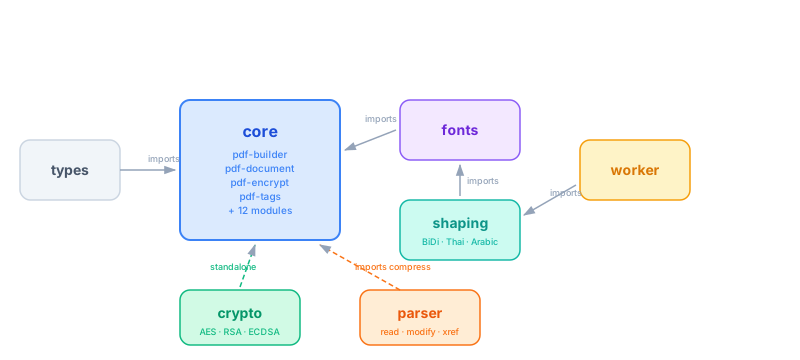
Built from scratch in pure TypeScript — tree-shakeable and auditable, with no transitive npm graph to install, audit or patch. Even the crypto is built in. The React and MCP packages add a small number of their own dependencies; see the responsibility page for the exact scope.
Thai, Arabic, Hebrew, Bengali, Tamil, Telugu, Sinhala, Tibetan, Khmer, Myanmar, Amharic, CJK, Cyrillic, Greek, Devanagari, and more. Full UAX #9 BiDi — isolates + explicit embeddings (LRE/RLE/LRO/RLO/PDF). OpenType GSUB/GPOS shaping for Thai, Arabic, Devanagari, Bengali, Tamil, Telugu, Sinhala, Tibetan, Khmer, and Myanmar. Plus COLRv1 colour emoji — with 51 flag and 22 ZWJ sequences as single colour ligatures since v1.7.0. Emoji guide →
Output conforming to PDF 1.7 (ISO 32000-1) and PDF/A-1b/2b/2u/3b (ISO 19005), the latter checked against the veraPDF reference validator in CI on every commit. PDF/UA structural validation, structure tree, XMP metadata, ICC profiles. Not an accredited conformance-tested product — what that does and does not mean.
AES-128/256 encryption with granular permissions. CMS/PKCS#7 and PAdES digital signatures — RSA and ECDSA P-256, with long-term validation: RFC 3161 timestamps, /DSS revocation material and document timestamps (PAdES B-B → B-LTA) through injected providers, so the engine never opens a socket. One-call placeholder injection via addSignaturePlaceholder(). Zero external crypto deps. LTV guide →
13 block types: tables, images, barcodes (5 ISO formats), native vector charts, SVG, AcroForm fields, TOC, watermarks, hyperlinks. Pure PDF vector ops — no rasterization. Smart tables: multi-page slicing with repeated headers, auto-wrap, zebra striping, captions, and per-cell borders. Document tools: bookmarks (/Outlines), page labels, viewer preferences, nested lists, and a merge / split / extract page-tree API. Print production (v1.7.0): bleed/trim/art/crop page boxes, crop & registration marks, /Trapped, large-format /UserUnit, custom OutputIntent ICC. Tables guide → · Manipulation guide → · Print guide →
AsyncGenerator streaming (including object-boundary page-by-page), Web Worker off-thread generation, PDF parser & modifier. 2691+ tests across 123 files, 95%+ statement coverage, SLSA provenance.
Use pdfnative from Claude Desktop, Cursor, Continue, Zed, and any other MCP client (Cline, Windsurf, Goose, Gemini CLI…) via pdfnative-mcp. 28 production tools incl. the complete PAdES ladder sign_pdf / add_ltv / timestamp_pdf, update_metadata, the read-only inspect_layout preview, page-tree merge_pdfs / split_pdf / extract_pages, markup annotate_pdf, the network-free draft_governance_issue, pdfA flag everywhere, and token-frugal read modes. Zero configuration beyond npx -y pdfnative-mcp.
Render, sign, inspect & verify PDFs from the terminal with pdfnative-cli. End-to-end signing pipeline (RSA + ECDSA-SHA256), real CMS/PKCS#7 verify with RFC 3161 detection, render --watch / --template / --font, batch & completion commands, automatic signature-placeholder injection. Read the CLI guide → · Try the playground →
Author PDFs declaratively in JSX with pdfnative-react. A custom React reconciler compiles <Document> / <Table> / <Barcode> trees on-device — no DOM, no headless browser. Live-preview hooks (usePdf, <PDFViewer>), streaming, and a token-frugal DocSpec for AI agents. React is a peer dependency of this package only. React guide → · Try the playground →
Nine chart kinds — bar and stacked bars (vertical or horizontal), line, area, scatter, pie and donut — drawn as PDF path operators with dual y-axes, log and time scales, and data labels. No rasterisation, no image round-trip, so they stay sharp at any zoom and tag as /Figure with alt text. Charts guide → · playground →
extractText() returns reading-order Unicode via /ToUnicode, with optional positioned runs and support for encrypted sources. The ingestion primitive for RAG pipelines and agents. Text-extraction guide →
Read an existing AcroForm’s fields, fill them, and optionally flatten them into static page content — including on encrypted documents, via incremental update. Form-filling guide →
Open password-protected PDFs with openPdf(bytes, { password }) — RC4, AES-128 and AES-256 — then merge, fill, annotate or re-encrypt the result. PDF-manipulation guide →
Two builders for every use case — table-centric financial reports or free-form documents.
import { buildPDFBytes, downloadBlob } from 'pdfnative';
const pdf = buildPDFBytes({
title: 'Monthly Report',
infoItems: [
{ label: 'Period', value: 'January 2026' },
{ label: 'Account', value: 'Main Account' },
],
balanceText: 'Balance: $1,234.56',
countText: '42 transactions',
headers: ['Date', 'Description', 'Category', 'Amount', 'Status'],
rows: [
{ cells: ['01/15', 'Grocery Store', 'Food', '-$45.00', ''],
type: 'debit', pointed: false },
{ cells: ['01/16', 'Salary', 'Income', '+$3,000.00', 'X'],
type: 'credit', pointed: true },
],
footerText: 'Generated by MyApp',
});
downloadBlob(pdf, 'report.pdf');
import { buildDocumentPDFBytes } from 'pdfnative';
const pdf = buildDocumentPDFBytes({
title: 'Project Report',
blocks: [
{ type: 'toc' },
{ type: 'heading', text: 'Executive Summary', level: 1 },
{ type: 'paragraph', text: 'This quarter saw strong growth...' },
{ type: 'image', data: chartBytes, width: 400,
align: 'center', alt: 'Revenue chart' },
{ type: 'list', style: 'bullet',
items: ['Revenue up 15%', 'Costs down 8%', 'Net profit +23%'] },
{ type: 'barcode', format: 'qr', data: 'https://example.com',
width: 80, ecLevel: 'M' },
{ type: 'svg', content: svgString, width: 300 },
{ type: 'formField', fieldType: 'text', name: 'notes',
label: 'Notes', width: 400 },
],
footerText: 'Confidential',
}, {
compress: true, // FlateDecode compression (layoutOptions — 2nd argument)
// For PDF/A output, add tagged: 'pdfa2b' here AND embed a font via
// fontEntries — see the PDF/A archival demo below.
});
import { registerFonts, loadFontData, buildDocumentPDFBytes }
from 'pdfnative';
// Register lazy-loaded Noto Sans font data modules
registerFonts({
th: () => import('pdfnative/fonts/noto-thai-data.js'),
ar: () => import('pdfnative/fonts/noto-arabic-data.js'),
bn: () => import('pdfnative/fonts/noto-bengali-data.js'),
ja: () => import('pdfnative/fonts/noto-jp-data.js'),
});
// Load only the scripts you need
const fonts = await Promise.all(
['th', 'ar', 'bn', 'ja'].map(loadFontData)
);
const fontEntries = fonts.filter(Boolean).map((fd, i) => ({
fontData: fd!, fontRef: `/F${3 + i}`,
lang: ['th', 'ar', 'bn', 'ja'][i],
}));
const pdf = buildDocumentPDFBytes({
title: 'Multi-Language Document',
blocks: [
{ type: 'heading', text: 'สวัสดี — مرحبا — こんにちは', level: 1 },
{ type: 'paragraph',
text: 'pdfnative renders Thai, Arabic (with BiDi), Bengali, ' +
'and Japanese — all from a single API call.' },
],
fontEntries,
});
Pick an example, edit the code, and watch the PDF render beside it — everything runs in your browser via the npm CDN. Nothing is uploaded anywhere.
The JSON is a pdfnative DocumentParams object — the same document the library, pdfnative-cli render and the generate_basic_pdf MCP tool consume. Share links (#doc=…) encode this JSON, never code.
Your browser does not preview PDFs inline (most mobile browsers do not) — use Download to open the generated file.
Need more? Browse all 48 generators (242 sample PDFs) on GitHub.
Four adoption paths — pick the one that fits your stack. All four are zero-config and zero-build.
For TypeScript / JavaScript apps.
npm install pdfnative
import { buildDocumentPDFBytes, extractText } from 'pdfnative';
const pdf = buildDocumentPDFBytes({
title: 'Hello',
blocks: [{ type: 'paragraph', text: 'Hello, world.' }],
});
extractText(pdf)[0].text; // 'Hello, world.' — parse any PDF back
Quick Start guide →
For shells, CI, and Makefiles.
echo '{"blocks":[{"type":"paragraph","text":"Hi"}]}' \
| npx pdfnative-cli render -o out.pdf
# Sign and verify (RSA or ECDSA)
npx pdfnative-cli sign -i out.pdf -o signed.pdf \
--key key.pem --cert cert.pem
npx pdfnative-cli verify -i signed.pdf
CLI guide →
For Claude Desktop, Cursor, Continue, Zed, …
{
"mcpServers": {
"pdfnative": {
"command": "npx",
"args": ["-y", "pdfnative-mcp"]
}
}
}
Drop into your MCP client config — the full tool set becomes available instantly.
MCP guide →For React, Next.js, and Remix apps.
npm install pdfnative-react pdfnative react
import { Document, Heading, renderToBytes } from 'pdfnative-react';
const pdf = renderToBytes(
<Document title="Hello">
<Heading level={1}>Hello, world.</Heading>
</Document>,
);
React guide →
Feature-by-feature comparison with popular PDF libraries.
What does your project need? Tick what applies — the matching rows light up and the verdict below is derived from the table, including the cases where another library is the better fit.
| Feature | pdfnative | pdfkit | jsPDF | pdfmake | pdf-lib |
|---|---|---|---|---|---|
| Runtime dependencies | 0 | 6 | 3 | 3 | 4 |
| TypeScript native | ✓ | @types | ✓ | @types | ✓ |
| Unicode scripts | 22 | Via fontkit | Custom fonts | Via pdfkit | Via @pdf-lib/fontkit |
| BiDi (Arabic / Hebrew) | ✓ | ✗ | ✗ | ✗ | ✗ |
| PDF/A compliance | 4 levels | ✗ | ✗ | ✗ | ✗ |
| AES encryption | 128 + 256 | ✓ | ✓ | ✓ | ✗ |
| Digital signatures | RSA + ECDSA | ✗ | ✗ | ✗ | ✗ |
| Barcodes / QR codes | 5 formats | ✗ | ✗ | QR | ✗ |
| SVG rendering | ✓ | ✓ | Plugin | ✓ | Paths only |
| Interactive forms | ✓ | ✓ | ✓ | ✗ | ✓ |
| Streaming output | ✓ | ✓ | ✗ | ✓ | ✗ |
| PDF parser / modifier | ✓ | ✗ | ✗ | ✗ | ✓ |
| Browser + Node.js | ✓ | Via bundler | ✓ | ✓ | ✓ |
| Tree-shakeable | ✓ | ✗ | ✗ | ✗ | ✓ |
Single-pass string assembly with no intermediate object graph. Measured with vitest bench — run it yourself with npx vitest bench.
Measured 2026-07-30 with vitest bench on an Intel Core i3 mini-PC (Node.js 22.17.0) — mean wall-clock time per document.
Full run context, sample counts and relative error: bench/RESULTS.md.
The embedded font rows exercise the CID/embedded-font code path using a synthetic TTF on Latin text — they are not a measurement of OpenType shaping or BiDi, which are not currently benchmarked.
Faster hardware (Apple M-series, desktop i7/i9) typically runs 2–4× quicker. Results may vary.
Run npx vitest bench to measure on your hardware.
Measured in this tab just now with performance.now() — one sample per size after a warm-up run, on whatever this device and browser happen to be doing. Indicative, not a benchmark: the CI reference above uses vitest bench with proper sampling. Browser engines typically run this workload slower than Node.
No carbon claims, no offsets, no badges. Just architectural choices that keep the runtime small, local, and verifiable from the source tree.
PDFs are assembled in the calling process — Node, browser, Worker, Deno, Bun. No SaaS round-trip; no document leaves the user's machine unless the application chooses to send it.
An empty dependencies field in package.json. No transitive npm graph to install, audit, or patch. The React and MCP packages each add a small number of their own — stated plainly rather than rounded down.
The library never opens a socket. Verifiable by reading the source — there is no analytics endpoint, no auto-update channel, no remote font fetch.
Read the full responsibility statement →
Every claim there links to the file that proves it — including an explicit list of what we deliberately do not measure or claim.
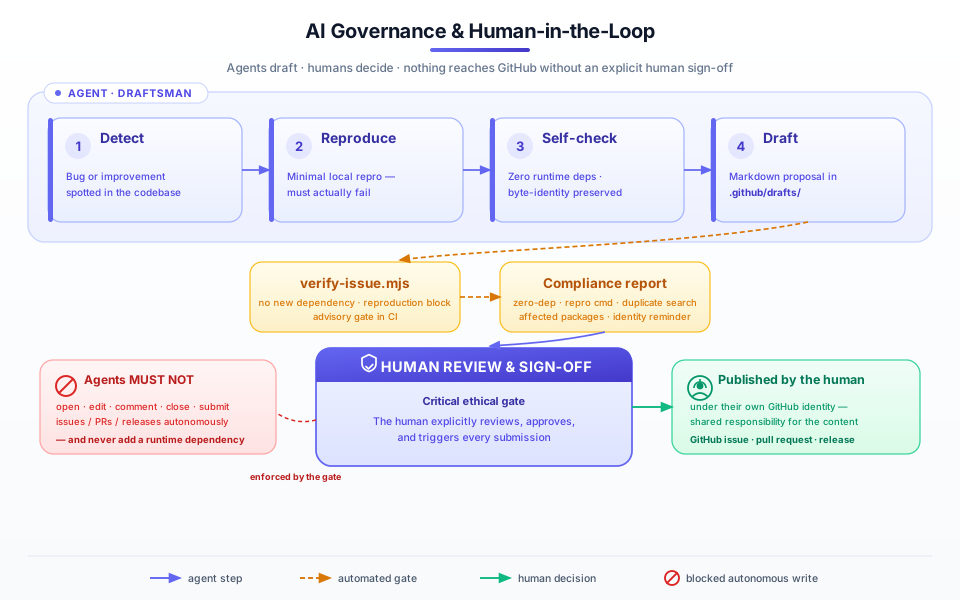
pdfnative is built with AI coding agents — and it governs them. A machine-readable contract and a human-in-the-loop protocol keep agents in a draftsman role: they may propose, but a human always reviews, approves, and submits. Nothing reaches GitHub autonomously.
Read the full protocol in the AI governance guide, or inspect the source of truth: .github/AGENT_RULES.md and .github/ai-governance.json.
pdfnative-mcp is a Model Context Protocol server that exposes the full pdfnative library to Claude Desktop, Cursor, Continue, Zed, and any other MCP-compatible AI client. One npx command, no code required. Now with the complete PAdES ladder (sign_pdf with RFC 3161 timestamps, add_ltv, timestamp_pdf), update_metadata, the read-only inspect_layout pagination preview, all 13 block kinds in generate_basic_pdf, print production, charts v2, page-tree merge_pdfs / split_pdf / extract_pages, markup annotate_pdf, the network-free draft_governance_issue, a pdfA flag on every document tool, and token-frugal read modes — on the MCP 2026-07-28 spec with automatic legacy fallback.
| Tool | Purpose |
|---|---|
generate_basic_pdf | Multi-page documents — all 13 block kinds since v1.6.0 (incl. tables, images, links, TOC, barcodes, SVG, form fields, charts). Optional pdfA, layout options, build-time encrypt, print production. |
add_table | Tabular reports — now with optional autoFitColumns and clipCells (pdfnative v1.2 TableBlock). |
add_barcode | QR Code, Code 128, EAN-13, Data Matrix, PDF417 |
add_international_text | 25 lang font codes (22 Unicode scripts + latin + emoji + explicit math) with BiDi & OpenType shaping. lang accepts string, string[], or comma-separated — e.g. ["ar", "emoji"]. |
add_form | Interactive AcroForm fields — text, textarea, checkbox, radio, dropdown, plus listbox and placeholder (v1.6.0) |
embed_image | JPEG / PNG image embedding, with align / alt (v1.6.0) |
prepare_signature_placeholder | PDF with /Sig field ready to sign; subFilter / reserveTimestamp (v1.6.0) |
sign_pdf | PAdES CMS signatures (RSA-SHA256/384/512 & ECDSA); profile: 'pades', RFC 3161 timestamp, cert chains, multiple signatures (v1.6.0) |
add_ltv | Embed /DSS + /VRI long-term-validation material — PAdES B-LT (v1.6.0). |
timestamp_pdf | Append a /DocTimeStamp through the operator TSA — PAdES B-LTA (v1.6.0). |
inspect_pdf | Read-only inspection — version, page count, encryption, PDF/A claim, signatures, info dict; signature / annotation inventories, page boxes, dss (v1.6.0); optional CI-style check assertions. |
inspect_layout | Read-only pagination dry run — page count and block geometry, no PDF produced (v1.6.0). |
validate_pdf | Read-only PDF/UA structural validation (valid, errors, warnings). |
verify_pdf | Real CMS/PKCS#7 signature verification — RSA & ECDSA, digest, certificate chain; /DocTimeStamp tokens and the ltv: true PAdES-level report (v1.6.0). |
add_attachment | Embed files (Factur-X / ZUGFeRD e-invoice XML) into PDF/A-3b output (v1.0.0). |
extract_attachments | Extract embedded files from existing PDFs (metadata-only mode available, v1.2.0). |
extract_text | Extract text content from an existing PDF via the native parser (v1.0.0). |
merge_pdfs | Concatenate 2–50 PDFs into one via the page-tree API (v1.3.0). |
split_pdf | Split one PDF into one document per page range — multi-output (v1.3.0). |
extract_pages | Pull an arbitrary, order-preserving page subset (max 5000) into a new PDF (v1.3.0). |
annotate_pdf | Overlay markup annotations (highlight / underline / note / shape) on an existing PDF via incremental update. A visual review layer, not a redaction (v1.4.0). |
draft_governance_issue | Assemble a governance-compliant GitHub-issue draft locally — network-free by construction; never submits (v1.4.0). |
add_chart | Render charts as native PDF vector paths — nine types since v1.6.0 (bar, horizontal bar, stacked bar, stacked horizontal bar, line, area, scatter, pie, donut), dual axis, log & time scales; no rasterisation (v1.5.0). |
read_form_fields | List an existing AcroForm's fields with their types, current values and options — the read half of the fill round-trip (v1.5.0). |
fill_form | Fill AcroForm field values and optionally flatten them into static page content (v1.5.0). |
encrypt_pdf | Re-secure an existing PDF with AES-128 or AES-256, setting owner/user passwords and permissions (v1.5.0). |
decrypt_pdf | Remove encryption from a password-protected PDF, in-server — RC4, AES-128 and AES-256 sources (v1.5.0). |
update_metadata | Rewrite /Info (+ XMP) of an existing PDF via incremental update (v1.6.0). |
{
"mcpServers": {
"pdfnative": {
"command": "npx",
"args": ["-y", "pdfnative-mcp"]
}
}
}
Supports Cursor, Continue, Zed, and any stdio MCP client. See the MCP Integration Guide → · Try the MCP playground →
Paste the agent brief into your assistant's context: the core API, the verified pitfalls that produce wrong code, and the self-verification loop — in about a page.
pdfnative-cli is the official command-line interface. 21 commands in five groups, zero extra runtime dependencies, stdin/stdout pipelines, NPM-provenance signed. It covers the whole document lifecycle: author with render, fill, annotate and metadata, restructure with merge / split / extract, secure with sign / verify / ltv / doc-timestamp / encrypt / decrypt — the complete PAdES ladder, B-B → B-LTA — read back with inspect, extract-text and compare, and automate with batch, doctor, schema, completion and the AI-governance govern gate. Installing the package puts a pdfnative binary on your PATH.
| Command | Purpose |
|---|---|
| Create & edit | |
render | JSON → PDF with hybrid flags + --layout. --watch (re-render on change), --template <file.json> (deep-merge base), --font {latin,emoji,math}, --outline auto (bookmarks), native chart blocks, --encrypt aes-128|aes-256, --inspect-layout / --debug-layout. |
fill v1.3 | Fill, flatten or export an AcroForm. --export dumps current values as JSON; feed the edited file back with --data. |
annotate v1.2 | Attach markup annotations via an incremental save — signatures stay valid. Encrypted PDFs supported with --password. |
metadata v1.4 | Update /Info + XMP via an incremental save — existing signatures remain valid for their revision. |
| Page tree | |
merge v1.2 | Concatenate 2–50 PDFs into one via the page-tree API. Reads encrypted sources with --password and can re-encrypt the result. |
split v1.2 | Split one PDF into many — one output per page or per range. Supports --stream for large inputs. |
extract v1.2 | Pull a selected, order-preserving page subset into a single PDF. |
| Security | |
sign | End-to-end CMS/PKCS#7 signing, delegating to node:crypto by default (--pure-crypto opts out). RSA-SHA256/384/512 + ECDSA; --timestamp <tsa-url> embeds an RFC 3161 token (PAdES B-T, v1.4); --profile pades, multi-signature and visible-widget placement. Auto-injects the AcroForm signature placeholder when missing. |
verify | Real CMS/PKCS#7 verification — signature value (RSA-SHA256/384/512 + ECDSA), message digest, certificate chain, trust roots, RFC 3161 timestamp-token and /DocTimeStamp validation, and OCSP/CRL revocation checking. JSON report. |
ltv v1.4 | Embed long-term-validation material into /DSS (PAdES B-LT). collect gathers evidence as replayable JSON so embed can run fully offline — air-gap friendly. |
doc-timestamp v1.4 | Append an RFC 3161 /DocTimeStamp revision covering every byte (PAdES B-LTA); repeatable to renew protection. |
encrypt v1.3 | Re-secure a PDF with AES-128 or AES-256, setting owner/user passwords and a permission set. |
decrypt v1.3 | Remove encryption with --password — RC4, AES-128 and AES-256 sources. |
| Read & extract | |
inspect | Read-only PDF analysis. --verbose, --pages, --annotations, --form-fields, --encryption, --signatures (v1.4), page labels, and --check pdfa|signed|encrypted|pdfua|"signatures>=N" for CI assertions. |
extract-text v1.3 | Reading-order Unicode text as text, json or ndjson, with optional positioned runs — a RAG/agent ingestion primitive. |
compare v1.4 | Text + structure diff of two PDFs with CI-friendly exit codes — identical → 0, different → report on stdout then exit 1. |
| Automation & meta | |
batch | Render every JSON file in a directory (--input-dir / --output-dir) — bounded parallelism, per-file status. Since v1.4, --manifest runs a declarative multi-command pipeline with @id references and an --allow-network opt-in. |
doctor v1.3 | Environment and capability preflight, text or --json. The first command to run in a new environment. |
schema | Print a JSON Schema or the full manifest capability document for agent tool-discovery. |
completion | Generate shell completion scripts (bash / zsh / fish / powershell). |
govern v1.2 | Surface the AI-governance / HITL contract — rules, policy, verify-issue. |
# Render → sign → verify, end-to-end
echo '{"blocks":[{"type":"paragraph","text":"Hello, signed world."}]}' \
| npx pdfnative-cli render -o out.pdf
npx pdfnative-cli sign -i out.pdf -o signed.pdf \
--algorithm ecdsa-sha256 \
--key key.pem --cert cert.pem --reason "Approved"
npx pdfnative-cli verify -i signed.pdf --strict
Keys, certs, and encryption passwords are read from env vars (PDFNATIVE_SIGN_KEY, PDFNATIVE_ENCRYPT_OWNER_PASS…) and never logged. See the CLI guide → · Try the CLI builder →
pdfnative-react is the official React renderer. A custom React reconciler compiles your JSX component tree — synchronously, with no DOM and no headless browser — into pdfnative blocks, then renders real ISO 32000-1 / PDF/A bytes on-device. React 19 is a peer dependency of pdfnative-react only — the core engine stays zero-dependency.
| Surface | What you get |
|---|---|
<Document> / <Page> | Document metadata, page size, headers/footers, tagged & PDF/A modes. |
| Content | <Heading>, <Text>, <List>/<Item>, <Table>/<Row>/<Cell>, <Image>, <Link>, <Barcode>, <Svg>, <FormField>, <Toc>, <Chart> — charts v2 since v1.2: 9 kinds, secondary axis, log/time scales, data labels. |
| Render | renderToBytes / renderToBlob / renderToStream / renderToFile — plus compileDocument for the raw params, print production via <Document print>, and HTTP caching (etag / cacheControl) on renderToResponse (v1.2). |
| Live preview | usePdf / usePdfStream hooks & client components <PDFViewer>, <PDFDownloadLink>, <BlobProvider>. |
| Agent-friendly | Token-frugal DocSpec (compileSpec/renderSpec*) with a published JSON Schema for LLM authoring. |
npm install pdfnative-react pdfnative react
import { Document, Heading, Text, Table, renderToBytes } from 'pdfnative-react';
const bytes = renderToBytes(
<Document title="Invoice #1024" footerText="Acme Inc">
<Heading level={1}>Invoice #1024</Heading>
<Text>Thank you for your business.</Text>
<Table headers={['Item', 'Total']} rows={[{ cells: ['Pro plan', '$49.00'], type: 'default', pointed: false }]} zebra />
</Document>,
); // → Uint8Array, a valid PDF
Compiles on-device — no SaaS round-trip, no Chromium. See the React guide → · Try the React playground →
The code that became pdfnative was originally built inside plika.app — a personal finance application requiring multi-language PDF bank statements across many Unicode scripts.
Rather than depending on heavy third-party libraries, the PDF engine was written from scratch with zero dependencies, strict ISO compliance, and native Unicode shaping. It was then extracted and open-sourced as an independent library for everyone.