Agentic workflows
How AI agents compose with pdfnative. pdfnative is designed so an autonomous agent can do more than call the engine — it can extend it at runtime and feed it content it generated itself, all without waiting for a library release. This guide documents three concrete, factual patterns and the exact public APIs they rely on.
All three patterns are built entirely on already-shipped, public API surfaces:
- The library's
registerFont()/loadFontData()font registry, thepdfnative/toolssub-path (parseFontData/compileFontData, since v1.5.0), and the bundledpdfnative-build-fontCLI. - The image entry points: the
imagedocument block (library + CLI) and theembed_imageMCP tool. - The typography, PDF/X and self-verification surfaces of v1.8.0:
layout.typography,layout.pdfx,validatePdfX(), and the machine contracts underdocs/data/that an agent reads before it writes.
There is no agent-specific API here — the point is that the existing surfaces were shaped so agents can use them autonomously, under the project's AI-governance / human-in-the-loop contract.
Pattern 1 — extend the engine at runtime, without a release#
pdfnative ships 31 bundled font-data modules (27 scripts plus Latin, math, and monochrome + colour emoji). But its font system is open: any TrueType/OpenType font becomes a first-class, CIDFont-embedded, subset-on-use font once it is registered. Registration is a runtime call — it does not require rebuilding or republishing pdfnative.
This is what lets an agent add a capability the moment a document needs it. In a
previous iteration of this project, an agent using the MCP server needed
mathematical symbols before the bundled Noto Sans Math font existed as a
release. Because the font registry is a public runtime API, the agent was able to
compile the font data and register it on the spot; the same font later shipped as
registerFont('math', …) in pdfnative 1.5.0. The library did not need to change
for the document to render — the release simply promoted an already-working
runtime pattern into a bundled default.
The three building blocks#
| API | Sub-path | What it does |
|---|---|---|
registerFont(lang, loader) / registerFonts({ … }) |
pdfnative |
Register a lazy font-data loader under a lang code. loadFontData(lang) resolves it on first use. |
parseFontData(bytes) → FontDataObject |
pdfnative/tools |
Parse a TTF/OTF in memory into a registerable font-data object (metrics, cmap, widths, GSUB/GPOS, /W array). Pure — no fs, no child_process, works in browsers / Deno / edge. |
compileFontData(bytes, { fontName }) → string |
pdfnative/tools |
Emit the ES/CJS module source for a font-data file — byte-identical to the pdfnative-build-font CLI. Useful when the agent wants to persist a reusable *-data.js. |
An agent registers a font at runtime#
import { buildDocumentPDFBytes, registerFont, loadFontData } from 'pdfnative';
import { parseFontData } from 'pdfnative/tools';

// The agent obtained the TTF bytes however it likes — a bundled asset,
// a user upload, or a fetch it performed itself.
const ttfBytes: Uint8Array = await getFontBytes();

// Parse in memory → a registerable font-data object.
const fontData = parseFontData(ttfBytes);

// Register it under a lang code. No release, no rebuild.
registerFont('custom', () => Promise.resolve(fontData));

// The registry is only consulted through loadFontData + fontEntries —
// load the data and pass it explicitly (fontRef must be a PDF name; /F1 and /F2 are reserved):
const custom = await loadFontData('custom');
if (!custom) throw new Error('custom font failed to load');

// It is now a first-class font: pdfnative subsets and embeds it on use.
const pdf = buildDocumentPDFBytes({
  title: 'Runtime font',
  blocks: [{ type: 'paragraph', text: 'Rendered with an agent-registered font.' }],
  fontEntries: [{ fontData: custom, fontRef: '/F3', lang: 'custom' }],
});
Persisting a reusable data module#
When an agent wants the font to be reusable across runs — or to hand a ready-made module to a human — it can emit the module source instead:
import { compileFontData } from 'pdfnative/tools';

const source = compileFontData(ttfBytes, { fontName: 'My Font' });
// `source` is byte-identical to what `pdfnative-build-font` writes to disk.
// A human (or a sandboxed file tool) can save it as `my-font-data.js`.
The equivalent one-liner for a human at a terminal is the bundled CLI:
npx pdfnative-build-font fonts/ttf/MyFont.ttf fonts/my-font-data.js
Via the MCP server — the local install is the extension point#
pdfnative-mcp bundles no font data of its own. At runtime it resolves the
locally installed pdfnative package and lazily imports font modules from that
package's fonts/ directory — its lang table is a mapping from language codes
to files it expects to find there. That design has a useful consequence for
agents operating on the host: whatever the local pdfnative installation
provides, the MCP server serves. A coding agent with filesystem access can
compile a missing font with compileFontData, drop the resulting *-data.js
into the resolved local install, wire up the local mapping, and the very next
MCP tool call renders with it — no release of either package in the loop. That
is exactly how the mathematical-symbols gap above was closed locally before
Noto Sans Math shipped upstream.
Two honest limits, so the pattern is used with open eyes:
- The published
add_international_texttool exposes a closedlangenum in its JSON Schema (an unknown code is rejected withUNSUPPORTED_LANG), so serving a new language code requires the agent to adjust the local mapping too — it is a local code-level extension, not a configuration flag. - There is no operator-facing extension point yet (no fonts-directory environment variable). Exposing one is a roadmap candidate, not a shipped capability.
Local, in-place extension by an agent and upstreaming through the governance contract are complementary: the first unblocks this document today, the second makes the capability durable for everyone.
Why this matters. The engine's coverage is not frozen at release time. An agent can close a glyph gap — a new script, a symbol set, a brand font — the instant a document requires it, then optionally graduate that work into a committed data module for the whole team. This is runtime extensibility, not autonomous modification of the published package: the agent extends its own in-process pdfnative instance; the repository is only ever changed by a human under the governance contract.
Pattern 2 — agent-generated images in the PDF#
Modern agents can generate raster content — charts, diagrams, illustrations,
photos. Image-generating agents (for example Antigravity, ChatGPT, and other
multimodal assistants) can pipe that output straight into a pdfnative document.
pdfnative treats a generated PNG/JPEG exactly like any other image: it parses it
natively and embeds it as an Image XObject (/DCTDecode for JPEG,
/FlateDecode for PNG) — no rasterization, no headless browser.
Via the MCP server — embed_image#
An agent that produced an image returns it as base64 and calls embed_image:
{
  "tool": "embed_image",
  "input": {
    "title": "Quarterly trend",
    "imageBase64": "<base64 PNG/JPEG the agent just generated>",
    "mimeType": "image/png",
    "outputMode": "base64"
  }
}
For a richer layout, the same base64 payload can be dropped into an image
block on generate_basic_pdf, alongside headings, tables, and barcodes the agent
assembles in the same call.
Via the library or CLI — the image block#
In code, a generated image is just another block:
import { buildDocumentPDFBytes } from 'pdfnative';

const pdf = buildDocumentPDFBytes({
  title: 'Report with a generated figure',
  blocks: [
    { type: 'heading', text: 'Findings', level: 1 },
    { type: 'paragraph', text: 'The figure below was generated on-device by the agent.' },
    { type: 'image', data: generatedPngBytes, width: 480 },
  ],
});
From the shell, an agent driving pdfnative-cli render supplies the same block
in its JSON document (image bytes are provided as a block field or an asset path,
subject to the CLI's path-validation rules).
Safety. pdfnative validates image inputs at the boundary — it parses the JPEG/PNG structure natively and rejects malformed or unsupported payloads (e.g. raw RGBA). The agent supplies pixels; pdfnative decides whether they are a well-formed image before embedding.
Pattern 3 — typeset and self-verify a print-ready document#
An agent producing a document for press has two problems a chat transcript cannot solve: the text must typeset (no heading stranded at the foot of a page, no single line orphaned, figures that line up) and the file must be something a printer accepts. v1.8.0 gives both as plain layout options plus a read-back verifier, so the agent can loop on facts instead of on a rendered preview it cannot see.
Read the machine contracts first#
Four files under docs/ are written for exactly this and are verified by the
documentation CI against the source they describe. An agent should load them
into context before authoring, not after the first failure:
| File | What it tells the agent |
|---|---|
docs/assets/api.json |
Every public export with its module and signature — the authoritative answer to "does this option exist and what does it take". |
docs/data/errors.json |
Every diagnostic code (diagnostics: when it fires, the standard it cites, the remedy) and every build-time message a tool must classify (buildErrors, including the seven PDF/X coherence errors). |
docs/data/surfaces.json |
Which capability each surface (library, CLI, MCP, React) offers, with the exact call, command or tool name — or the honest note when it does not. |
docs/data/playgrounds.json |
The browser playgrounds and the engine version each one pins, for a visual check a human can open. |
The loop#
import { readFileSync } from 'node:fs';
import { buildDocumentPDFBytes, validatePdfX, inspectDocumentLayout } from 'pdfnative';
import type { PdfDiagnostic } from 'pdfnative';

const diagnostics: PdfDiagnostic[] = [];
const doc = { ...params, fontEntries, metadata: { trapped: 'False' as const } };
const layout = {
  typography: {
    splitParagraphs: true, orphans: 2, widows: 2,   // no stranded lines
    keepHeadingsWithNext: { minLines: 3 },          // a heading takes three lines with it
    unitBinding: true, opticalMargins: true,
    kerning: true, fontFeatures: ['pnum'],          // pair kerning; proportional figures
  },
  pdfx: 'pdfx4',
  outputIntent: {
    iccProfile: new Uint8Array(readFileSync('ISOcoated_v2_eci.icc')),  // the printer's profile
    outputConditionIdentifier: 'FOGRA39',
  },
  print: { bleed: 14.17, marks: { colourBars: true } },   // 5 mm bleed: room for 12 pt patches
  onDiagnostic: (d: PdfDiagnostic) => { diagnostics.push(d); }, // PDFX_*, TYPOGRAPHY_* codes
};

// 1. Plan: page count and block geometry, no bytes produced.
const plan = inspectDocumentLayout(doc, layout);

// 2. Build. Incoherent PDF/X input throws here, with a message from errors.json buildErrors.
const pdf = buildDocumentPDFBytes(doc, layout);

// 3. Verify what the structure can prove, then branch.
const report = validatePdfX(pdf);      // { valid, errors, warnings }
if (!report.valid || diagnostics.length > 0) {
  // correct the input — embed the missing font, remove the link block,
  // switch the colour to CMYK — and rebuild; never hand over an unverified file
}
The decision points are all machine-readable: a thrown build error names the
conflicting options (layout.pdfx and layout.tagged cannot be combined,
PDF/X-4 requires layout.outputIntent, …); a diagnostic carries a stable
code (PDFX_NO_FONT_ENTRIES → pass fontEntries; PDFX_ANNOTATIONS →
remove links and form fields; PDFX_DEVICE_CMYK → CMYK colour under a
non-CMYK profile; TYPOGRAPHY_FEATURE_INEFFECTIVE → the tag substitutes
nothing with this font, drop it); and validatePdfX() returns the errors as
strings the agent can act on. Pin layout.creationDate (or
setDefaultCreationDate()) and TZ when the loop must produce identical
bytes across runs.
Honest caveat.
validatePdfX()checks the ISO 15930-7 prerequisites that structure can prove and does not render; a certified preflight remains the last step before press. On the CLI,layout.typographyandlayout.pdfxtravel in the document JSON or a--layoutfile (renderforwards the layout object to the installed engine), butinspect --checkknowspdfuaonly; on MCP, neither option is in the document tools' layout schema yet —surfaces.jsonstates this per capability.
How the patterns fit together#
A single agent turn can combine all three: register a brand font, generate a cover image, typeset the body under widow and orphan rules, and hand over a PDF/X-4 file that the agent itself verified — in one MCP conversation or one CLI pipeline, without a pdfnative release in the loop.
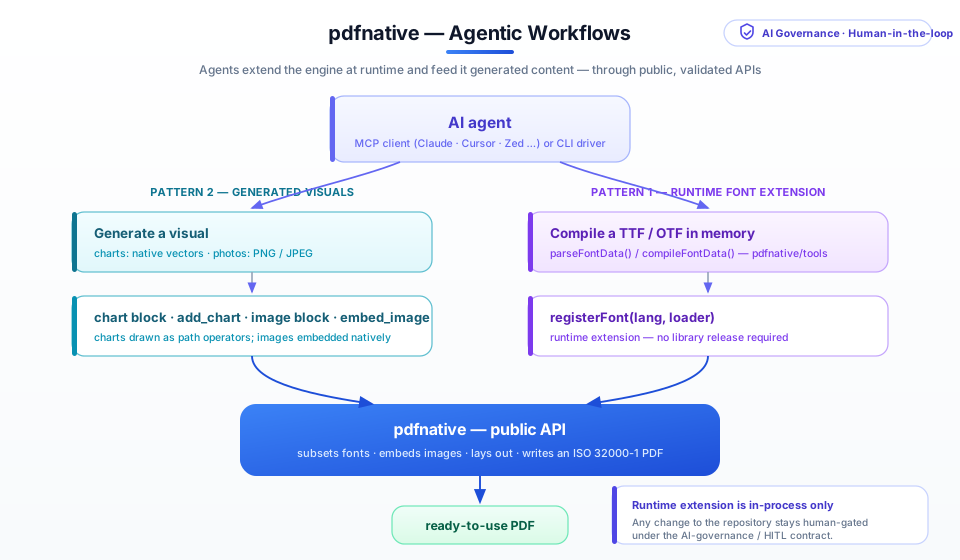
The engine stays zero-dependency and unchanged; the agent supplies fonts and images through public, validated entry points. Anything that would modify the repository — a new bundled font, a code change — still goes through a human under the AI-governance / human-in-the-loop contract.
See also#
- AI governance & human-in-the-loop — the contract that keeps repository changes human-gated.
- MCP integration — the 28 MCP tools, including
embed_imageanddraft_governance_issue. - CLI guide — driving pdfnative from the shell.
- Font validation —
validateFontData()for sanity-checking a font module before registering it. - Typography and Print production — the options
Pattern 3 sets, and what
validatePdfX()checks. - Self-verifying generation — the generate → inspect → assert → correct loop on every surface.