# React use cases
> **Three architectures built on pdfnative-react v1.3.0 (peer `pdfnative ^1.8.0`,
> React `^19.0.0`, Node ≥ 22).** Lint a document model in CI before any PDF
> exists; typeset long-form documents like a book from JSX; and render one
> component tree into a screen PDF/A file and a press PDF/X-4 file. Every prop,
> export and lint rule named below ships in v1.3.0.
This guide is the React companion to the [ecosystem use cases](use-cases.html),
which sets the convention (problem, load-bearing code, gains, limits — with an
architecture diagram where data crosses components) and covers the cross-surface architectures. The
[React guide](react.html) is the reference for the components, the rendering
entry points and the `DocSpec` authoring surface used here.
## Case 1 — A DocSpec lint gate in CI, before any PDF exists
Most document bugs are visible in the model long before a byte is written: a
PDF/A claim with no embedded fonts, a chart with two series in a pie, a
`pdfx` document whose output intent is a monitor profile. pdfnative-react
compiles JSX and `DocSpec` to the same `DocumentParams`, and `lintDocument` /
`lintSpec` run **37 rules** on that model — 23 errors, 13 warnings, 1 info —
without rendering. The twelve rules added in v1.3.0 cover the engine 1.8.0
surface: `L_TYPOGRAPHY_INEFFECTIVE`, `L_PRINT_COLOUR_BARS`,
`L_CMYK_INTENT_MISMATCH`, `L_OUTPUT_INTENT_PROFILE` and the eight
`L_PDFX_*` rules (`L_PDFX_TARGET`, `L_PDFX_TAGGED_CONFLICT`,
`L_PDFX_ENCRYPTED`, `L_PDFX_OUTPUT_INTENT`, `L_PDFX_TRAPPED_UNKNOWN`,
`L_PDFX_BOXES`, `L_PDFX_NO_FONTS`, `L_PDFX_ANNOTATIONS`).
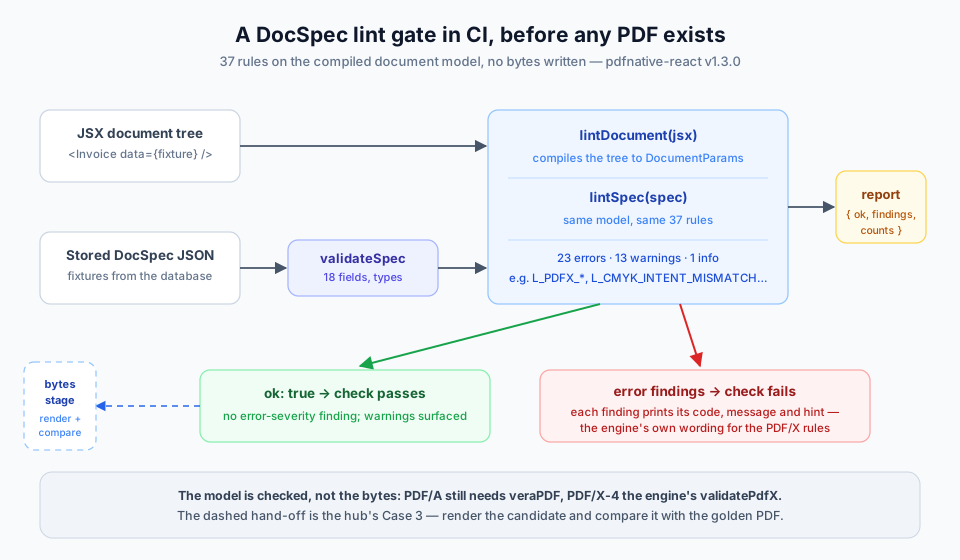
The stored-spec route pairs `validateSpec` (is this JSON a `DocSpec` at all —
unknown fields, wrong types, the 18 `DOC_SPEC_FIELDS` including the 1.3.0
`pdfx`, `outputIntent`, `typography` and `creationDate`) with `lintSpec` (is
it a document the engine will accept and a reader can use). Both return plain
data: a `LintReport` is `{ ok, findings, counts }`, where `ok` is `false` only
when a finding has severity `'error'`.
```tsx
// tests/documents.lint.test.tsx — runs on every pull request; writes nothing.
import { describe, expect, it } from 'vitest';
import { lintDocument, lintSpec, validateSpec } from 'pdfnative-react';
import type { DocSpec } from 'pdfnative-react';
import { Invoice } from '../src/documents/Invoice.js';
import stored from './fixtures/stored-specs.json'; // DocSpecs as the database holds them
import fixture from './fixtures/invoice.json';
describe('document lint gate', () => {
it('the JSX invoice has no blocking finding', () => {
const report = lintDocument(, { overflow: true });
expect(report.findings.filter((f) => f.severity === 'error')).toEqual([]);
});
it.each(stored)('stored spec $title still validates and lints', (spec: unknown) => {
expect(validateSpec(spec).errors).toEqual([]); // shape: fields and types
const report = lintSpec(spec as DocSpec); // model: engine + accessibility
expect(report.ok, JSON.stringify(report.findings, null, 2)).toBe(true);
});
});
```
What you gain, concretely:
- **Throws become findings.** Of the 37 rules, twenty pre-empt an exception the
engine raises at build time and five mirror an engine diagnostic (a warning
on the default channel, a throw under `layout.strict`). For the six PDF/X
coherence rules the finding's message is the engine's message.
- **One report for both doors.** JSX and JSON compile to the same model, so a
rule written once covers the component tree your developers write and the
specs your agents or your database produce. The rule table is exported as
`LINT_RULES`, the code list as `LINT_RULE_CODES`.
- **Composes with the hub.** This is the model stage; hub
[Case 3](use-cases.html#case-3--a-document-regression-gate-in-ci) is the
bytes stage (`render` + `compare` against a golden PDF), and hub
[Case 1](use-cases.html#case-1--store-the-spec-not-the-pdf) is where the
stored specs in the fixture come from.
Honest limits: lint checks the **model, not the bytes**. A PDF/A claim is
still verified by veraPDF on the rendered file, and a PDF/X-4 claim by the
engine's structural validator, which is deliberately not re-exported — it is
one import away, as `docs/RECIPES.md` in the package shows:
```tsx
import { validatePdfX } from 'pdfnative';
import { renderToBytes } from 'pdfnative-react';
const { valid, errors } = validatePdfX(renderToBytes());
```
`L_OVERFLOW` (a block taller than the page) needs a full layout pass and is
opt-in through `{ overflow: true }` — it costs about as much as rendering.
There is no visual check: nothing in the model says whether the page *looks*
right.
## Case 2 — Long-form documents typeset like a book, in JSX
A report that runs to forty pages exposes every default of a naive
paginator: a heading stranded at the foot of a page, a single line carried to
the next one, ragged right margins in a two-column brief. Engine 1.8.0 ships a
typography engine, and pdfnative-react v1.3.0 exposes it as a ``
prop (`typography`, sugar over `layout.typography`) with per-block overrides:
``, ``.
```tsx
import { Document, Heading, Paragraph, Table, inspectDocument, renderToBytes,
resolveFonts, setHyphenationProvider } from 'pdfnative-react';
const fontEntries = await resolveFonts({ latin: () => import('pdfnative/fonts/noto-sans-data.js') });
setHyphenationProvider((word, lang) => hyphenate(word, lang)); // optional: your Liang-pattern library
const book = (
Chapter 1
Habitat
{chapterOne}
Table 1 summarises the ranges:
);
const { totalPages } = inspectDocument(book); // the same planner, no bytes
if (totalPages > 48) throw new Error(`page budget exceeded: ${totalPages} pages`);
const bytes = renderToBytes(book);
```
`inspectDocument` runs the planner that `renderToBytes` uses and returns the
page count and every block's placement, so a page budget or a "table 1 is on
the same page as its caption" assertion is a unit test, not a PDF you open.
What you gain, concretely:
- **All twelve engine keys, locked at compile time.** `splitParagraphs`,
`orphans`, `widows`, `keepHeadingsWithNext`, `unitBinding`,
`bindShortWords`, `punctuationSpacing`, `opticalMargins`, `metrics`,
`fontFeatures`, `kerning` and `hyphenationLanguage` are typed against the
engine's `TypographyOptions`; a key the engine adds later is a build error
in pdfnative-react, not a silently ignored prop.
- **Byte-identical when unset.** A document without `typography` compiles to
the same `DocumentParams` as before; every key is opt-in.
- **Ineffective settings are warnings before render.**
`L_TYPOGRAPHY_INEFFECTIVE` reports `orphans` / `widows` without
`splitParagraphs`, an unknown `fontFeatures` tag, a line quota below 1, and
`kerning`, `fontFeatures` or the `'fr'` punctuation preset without a
registered font.
Honest limits: `kerning`, `fontFeatures` and the narrow no-break space of
`punctuationSpacing: 'fr'` need a registered font (`fontEntries`) — the
base-14 faces carry no OpenType tables and no U+202F. `tnum` and `lnum` are
no-ops on the bundled Noto Sans, whose figures are tabular and lining already.
No hyphenation dictionary ships: soft hyphens (U+00AD) are honoured, and a
provider set through `setHyphenationProvider` receives `hyphenationLanguage`
with every word. The React renderer does not sign, fill forms or post-process
existing PDFs — hand its bytes to the CLI or the engine for that.
## Case 3 — One component tree, two palettes: screen PDF/A and press PDF/X-4
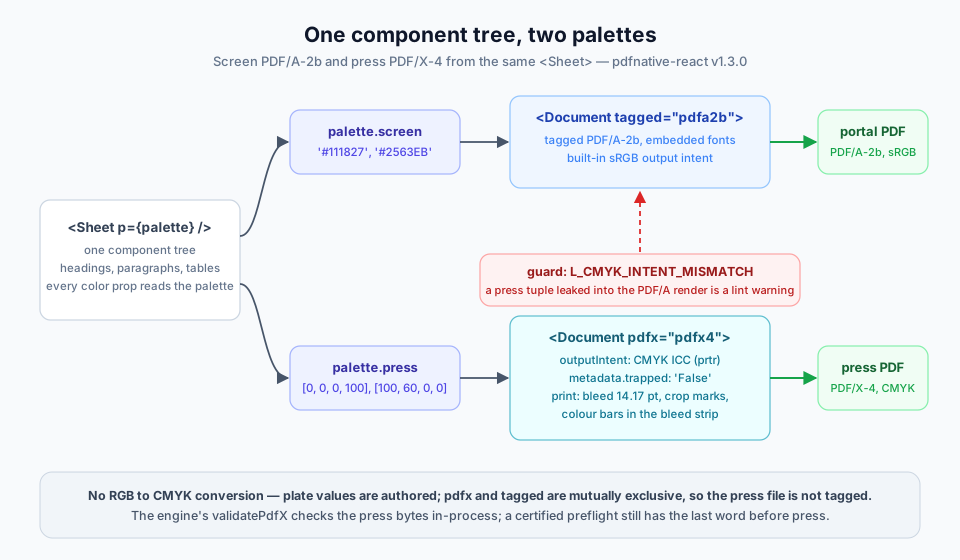
The same catalogue goes to a customer portal and to a printer, and the two
files have contradictory requirements: the portal wants a tagged PDF/A-2b file
with sRGB colours; the press wants PDF/X-4 with CMYK plate values, a printer
output intent, a bleed and colour bars — and PDF/X forbids the `tagged`
claim. In v1.3.0 every colour prop accepts a CMYK value beside hex and RGB, and
`pdfx`, `outputIntent` and `print` are `` props, so the palette is
the only thing that changes between the two renders.
```tsx
import { Document, Heading, Paragraph, renderToBytes } from 'pdfnative-react';
const palette = {
screen: { ink: '#111827', accent: '#2563EB' }, // hex, for the portal
press: { ink: [0, 0, 0, 100], accent: [100, 60, 0, 0] }, // C M Y K in percent, for the press
} as const;
const Sheet = ({ p }: { p: (typeof palette)[keyof typeof palette] }) => (
<>
Spring catalogue
Prices valid until 30 June.
);
const portal = renderToBytes(
);
const press = renderToBytes(
);
```
`iccProfile` is the printer's ICC profile as bytes (a `prtr` device class —
a monitor profile such as sRGB is refused by `L_PDFX_OUTPUT_INTENT`), and
`trapped: 'False'` states the trapping status PDF/X requires — pdfnative never
traps. A 5 mm bleed (14.17 pt) is the strip the engine recommends for the
colour bars: below it the patches fall under a densitometer aperture and
`L_PRINT_COLOUR_BARS` warns; under 4 pt the engine skips the bars.
What you gain, concretely:
- **One tree, two conformance claims.** The components, the copy and the
layout are written once; `tagged="pdfa2b"` and `pdfx="pdfx4"` are wrapper
props, not forks of the template.
- **A leaked press token is a lint warning.** A CMYK value inside the PDF/A
render trips `L_CMYK_INTENT_MISMATCH` (the built-in PDF/A intent is sRGB),
mirroring the engine's `PDFA_DEVICE_CMYK_CONTENT` diagnostic; a monitor
profile on the press render trips `L_PDFX_OUTPUT_INTENT`. Skip the linter
and the profile error reaches `toErrorEnvelope` as `E_INPUT`, while the
CMYK leak stays a `PDFA_DEVICE_CMYK_CONTENT` diagnostic (a throw only under
`layout.strict`).
- **Press marks without a prepress tool.** `print.marks.colourBars` draws the
four process colours at 100 % and 50 % in the bottom bleed strip; the crop
marks stop 0.5 pt short of the trim line.
Honest limits: there is **no RGB → CMYK conversion** — plate values are
authored, and the engine performs no colour management beyond mapping RGB
content under a CMYK or Gray intent through `/DefaultRGB`. `pdfx` and `tagged`
are mutually exclusive (one conformance claim per file), so the press file is
not tagged. The bytes-level PDF/X-4 check is the engine's `validatePdfX`
import shown in Case 1, and a `valid` result means the structural
prerequisites hold — confirm the file with a certified preflight before it goes
to press. No press profile ships with either package; the ICC profile is yours.
## See also
- [Ecosystem use cases](use-cases.html) — the hub: stored specs, air-gapped
PAdES B-LTA, the CI regression gate, edge caching and zipnative as the
DEFLATE codec.
- [React guide](react.html) — components, rendering entry points and the
`DocSpec` authoring surface.
- [CLI use cases](use-cases-cli.html) and [MCP use cases](use-cases-mcp.html)
— the sibling per-surface guides.
- [React playground](../playgrounds/react.html) — the JSX renderer in the
browser.
- [DocSpec lint playground](../playgrounds/docspec-lint.html) — paste a
`DocSpec`, read the 37-rule report.